


Welcome
The Brass Bed Gift Registry makes it easy to share the linens and furnishings you love most with the people who want to celebrate with you. Whether you're building a registry for your wedding, a new baby, a housewarming, or any other occasion, this guide will walk you through every step.
This document has two parts:
- Part 1 — For Registrants: If you're creating a registry to share with friends and family.
- Part 2 — For Gifters: If you've received a registry link and would like to send a gift.
Quick links: Visit brassbedfinelinens.com/pages/gift-registry to get started, or skip to Part 2 if you've been invited to shop a registry.
Sign in or create an account
Visit brassbedfinelinens.com/pages/gift-registry and click Create a Registry (or My Registries) — you'll be prompted to sign in with your Brass Bed customer account. If you don't have one yet, you can create an account in under a minute from the same screen.
You need to be signed in so we can save your registry to your account — this is also how you'll come back to manage it later.
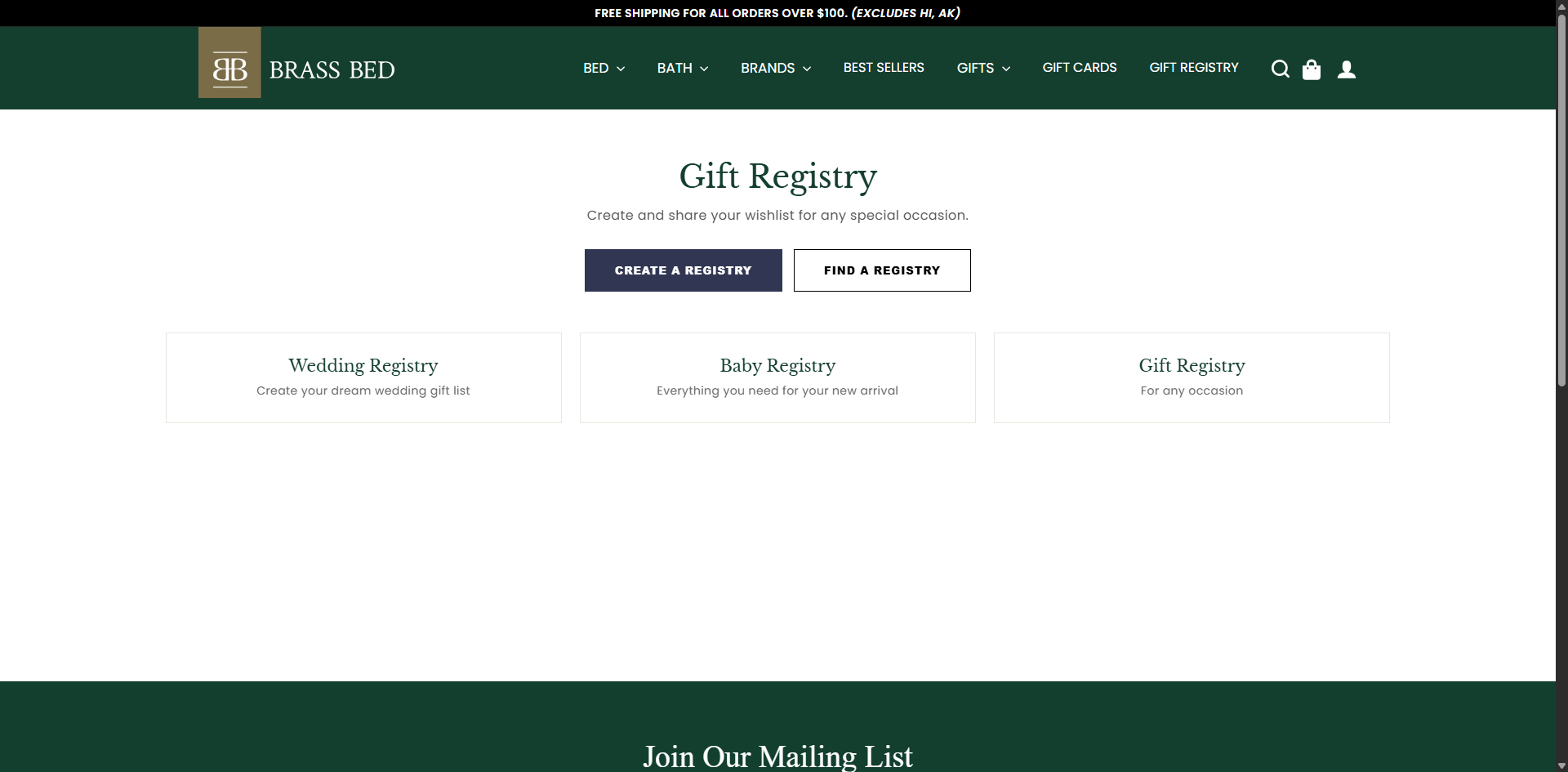
Gift Registry home — The starting point. Choose "Create a Registry" to begin a new one or "Find a Registry" to shop someone else's. Browse by occasion below: Wedding, Baby, or General.
Create your registry
Click Create a Registry. A guided 6-step form will walk you through everything we need:
- Step 1 — Type: Choose your occasion: Wedding, Baby, or General.
- Step 2 — Details: Give your registry a title and event date.
- Step 3 — People: Enter the names of brides and/or grooms (or parents-to-be) that should appear on the registry.
- Step 4 — Shipping: Add the address gifts should be sent to (USA addresses, excluding Hawaii and Alaska).
- Step 5 — Privacy: Choose whether your registry is public or password-protected.
- Step 6 — Review: Confirm your details and create the registry.
You can always edit any of these details later from the My Registries page.
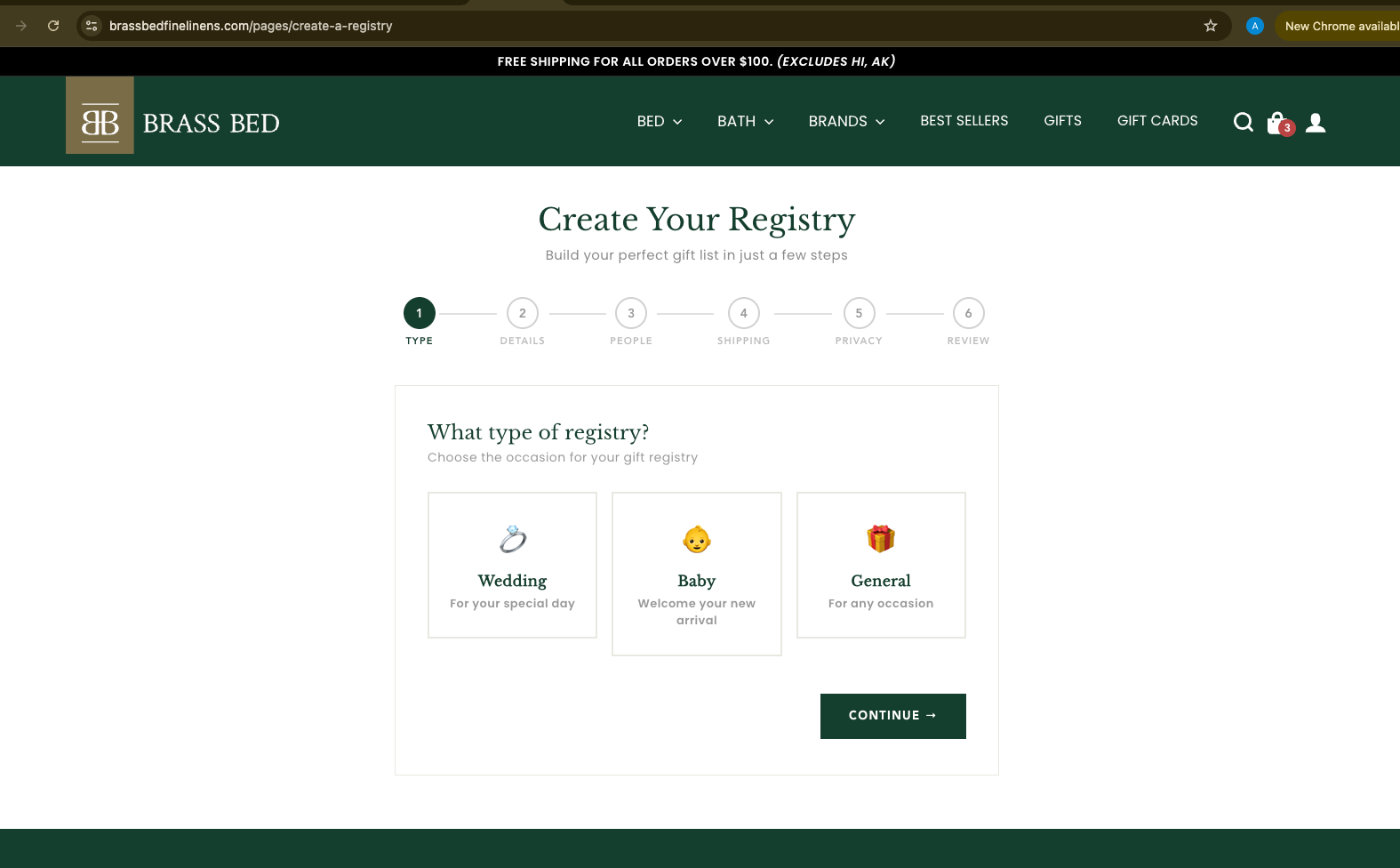
Create a Registry — Step 1 — Choose the occasion to begin. Each subsequent step is short, with clear "Back" and "Next" buttons.
Privacy tip: If you choose to password-protect your registry, only people you share the password with can view it. Public registries can be found via the "Find a Registry" search by anyone you share the name with.
Add products from the store
Browse the Brass Bed website as you normally would. On any product page you’ll see a ♥ Add to Registry button just below “Add to Cart”. Choose your colors, sizes, and quantities exactly as you would when adding to your cart, then click Add to Registry.
Some items, like our bedding sets, are made up of several pieces — just set the quantity for the pieces you’d like, and each one will be saved as its own gift on your registry so guests can buy them individually
If you have more than one registry, you’ll be asked to choose which one to add the item to.
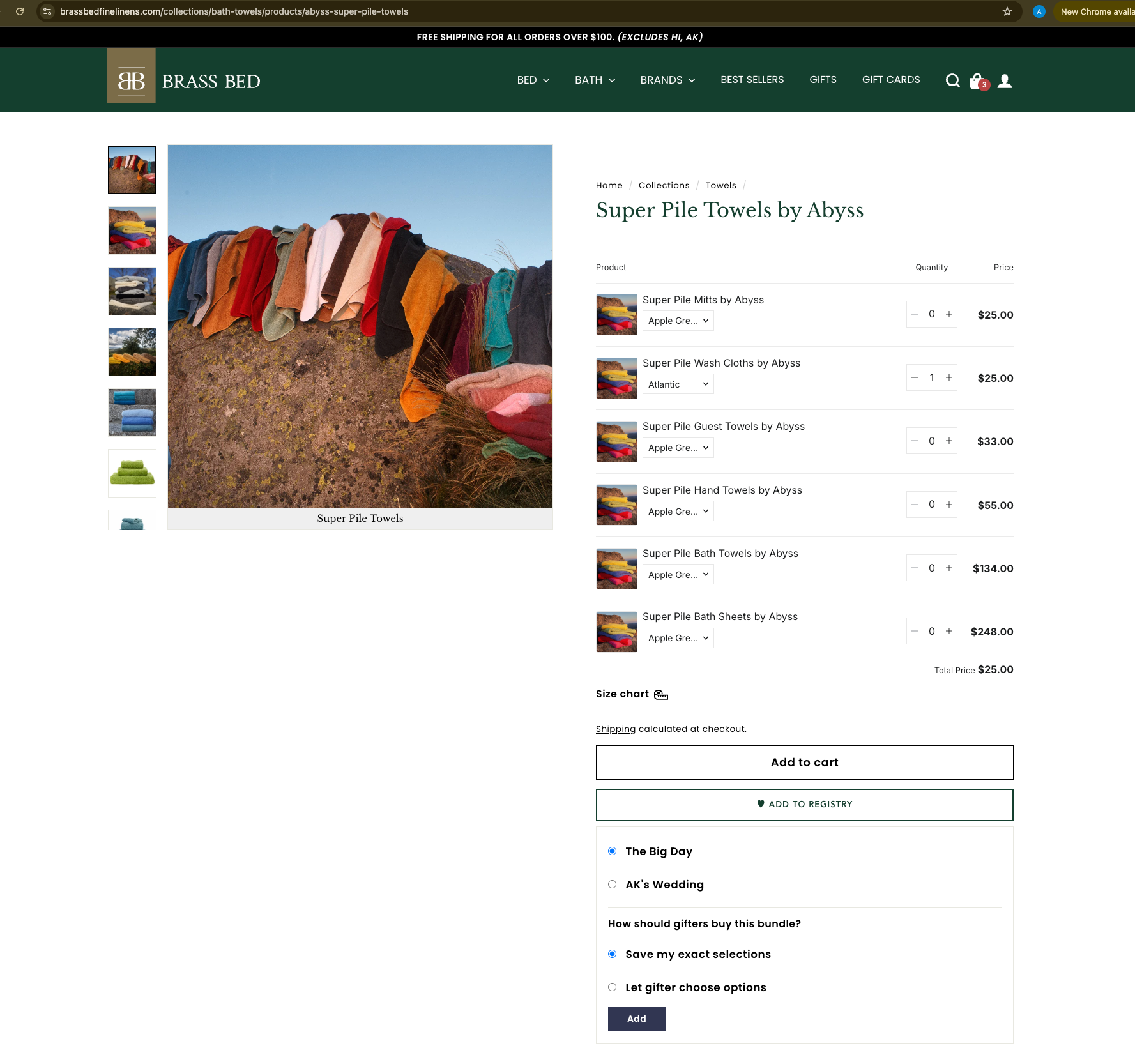
Add to Registry button — Appears on every product page when you’re signed in. Set your options the same way you would for a regular purchase, then click the button.
Manage your registry
Visit My Registries any time to see what you've built. From here you can:
- Manage Items — Review every product you’ve added and remove anything you no longer want.
- Edit Details — Update your registry's name, event date, or shipping address.
- Publish / Unpublish — Toggle whether the registry is visible to gifters.
- Share & View — Once published, copy your shareable link or preview the public page.
- Delete — Permanently remove the registry.
The dashboard shows a contextual Next Steps guide for every registry, so you always know what to do next — whether you're still adding products, almost ready to publish, or already live.
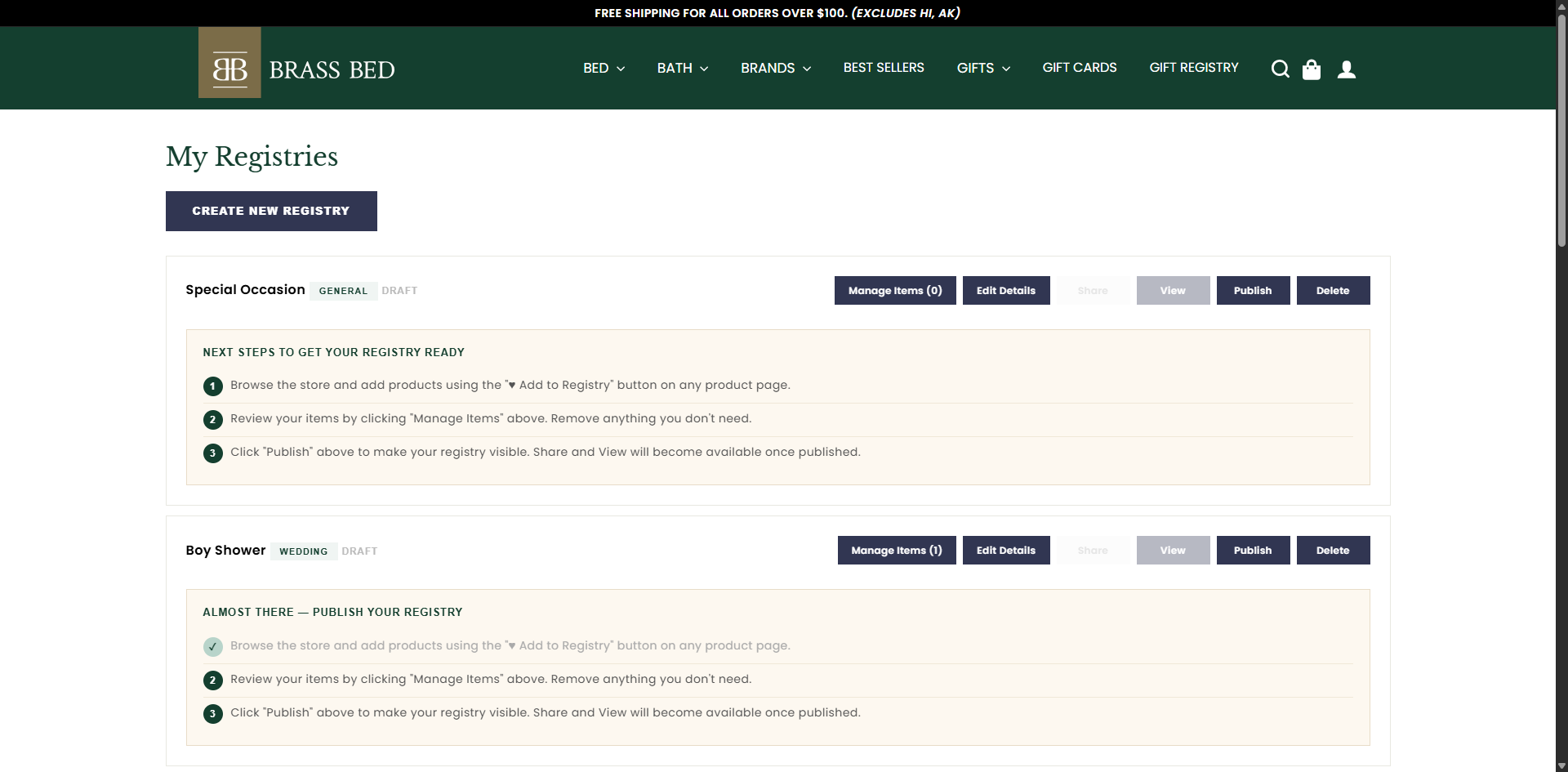
My Registries dashboard — Each registry card shows item counts, action buttons (Manage Items, Edit Details, Share, View, Publish/Unpublish, Delete), and a guide for the next thing to do.
Publish & share with friends and family
When you're happy with your selections, click Publish on the registry card. This makes your registry visible to gifters — the Share and View buttons unlock at the same moment.
Click Share to copy your unique registry link. Paste it into a text, email, invitation, or anywhere else you'd like to share. Anyone with the link can view your registry and shop from it.
You can keep adding items to your registry even after it's published — new items appear immediately for gifters. Click Unpublish at any time to pause visibility without losing your data.
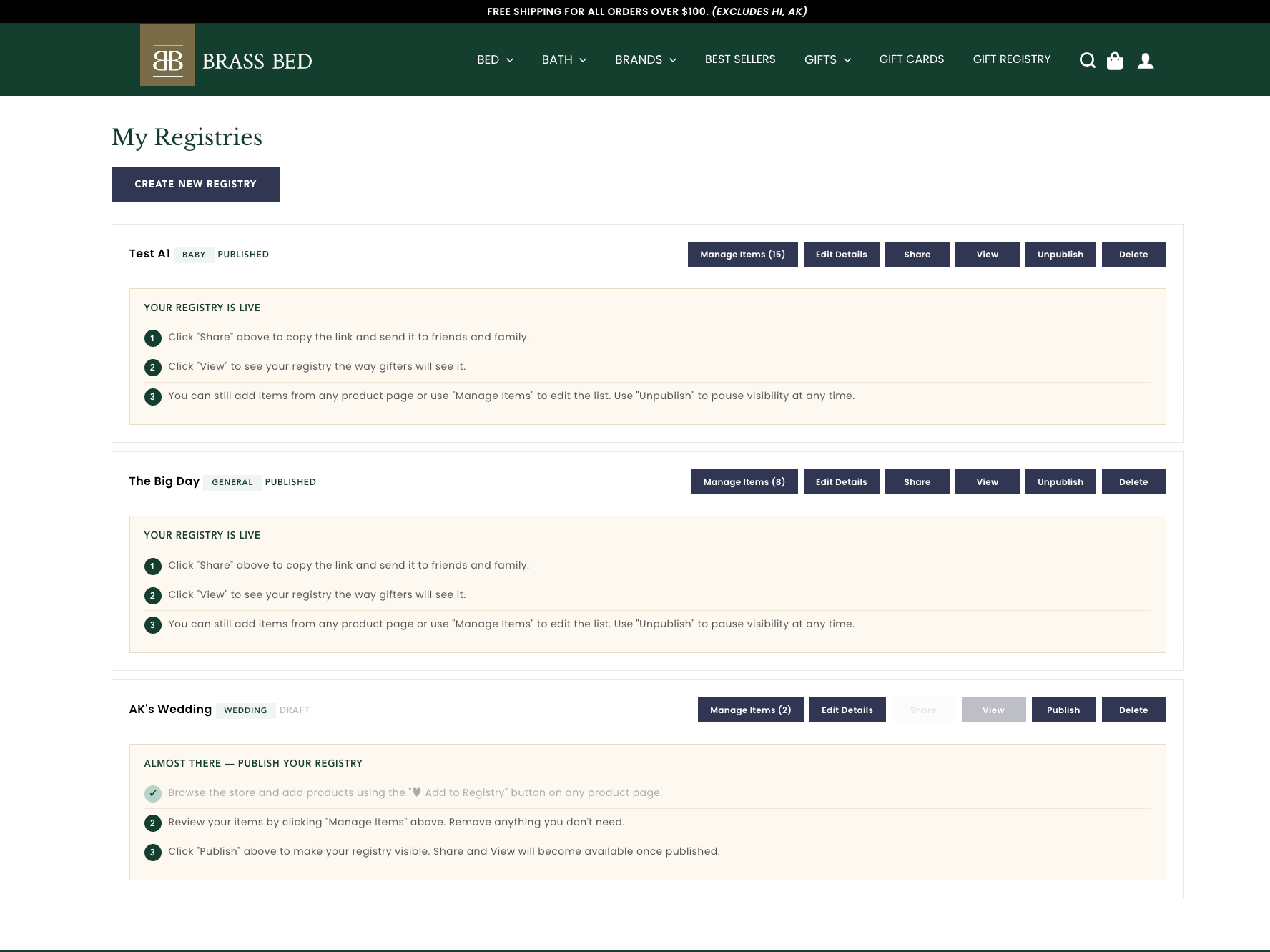
Published & share-ready — Once a registry is published, the card flips to a “Published” badge and the Share & View buttons turn on. Click Share to copy your registry link, or View to preview the page exactly as your gift-givers will see it. The Publish button now reads “Unpublish” — click it any time you want to pause visibility and take the registry back to draft.
Open the registry
You can reach a registry two ways:
- From a shared link: Click the link the registrant sent you. It will take you straight to their registry page.
- By searching: Visit brassbedfinelinens.com/pages/find-a-registry and search by the registrant's name, registry type, or event date.
If the registry is password-protected, you'll see a simple password screen first — ask the registrant for the password if you weren't sent it.
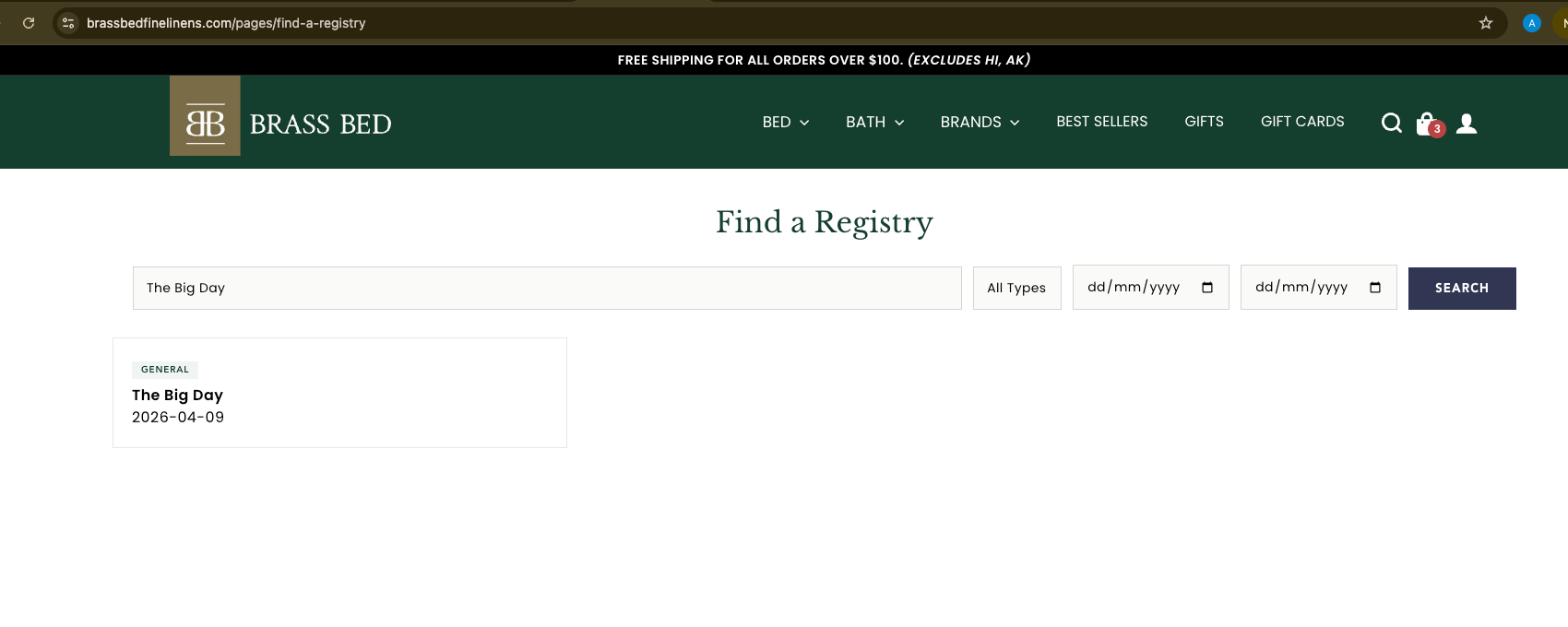
Find a Registry — Search publicly listed registries by name, type, or date. Results appear instantly as you type.
Browse and select gifts
The registry page shows you everything the registrant has chosen, with photos, exact colors and sizes, prices, and which items have already been gifted by others. Use the filter tabs to switch between All, Still Needed, and Fulfilled.
To gift an item, simply check the “Select to give” box on its card. You can pick as many items as you’d like in a single visit. A running total stays visible at the bottom of the page as you select.
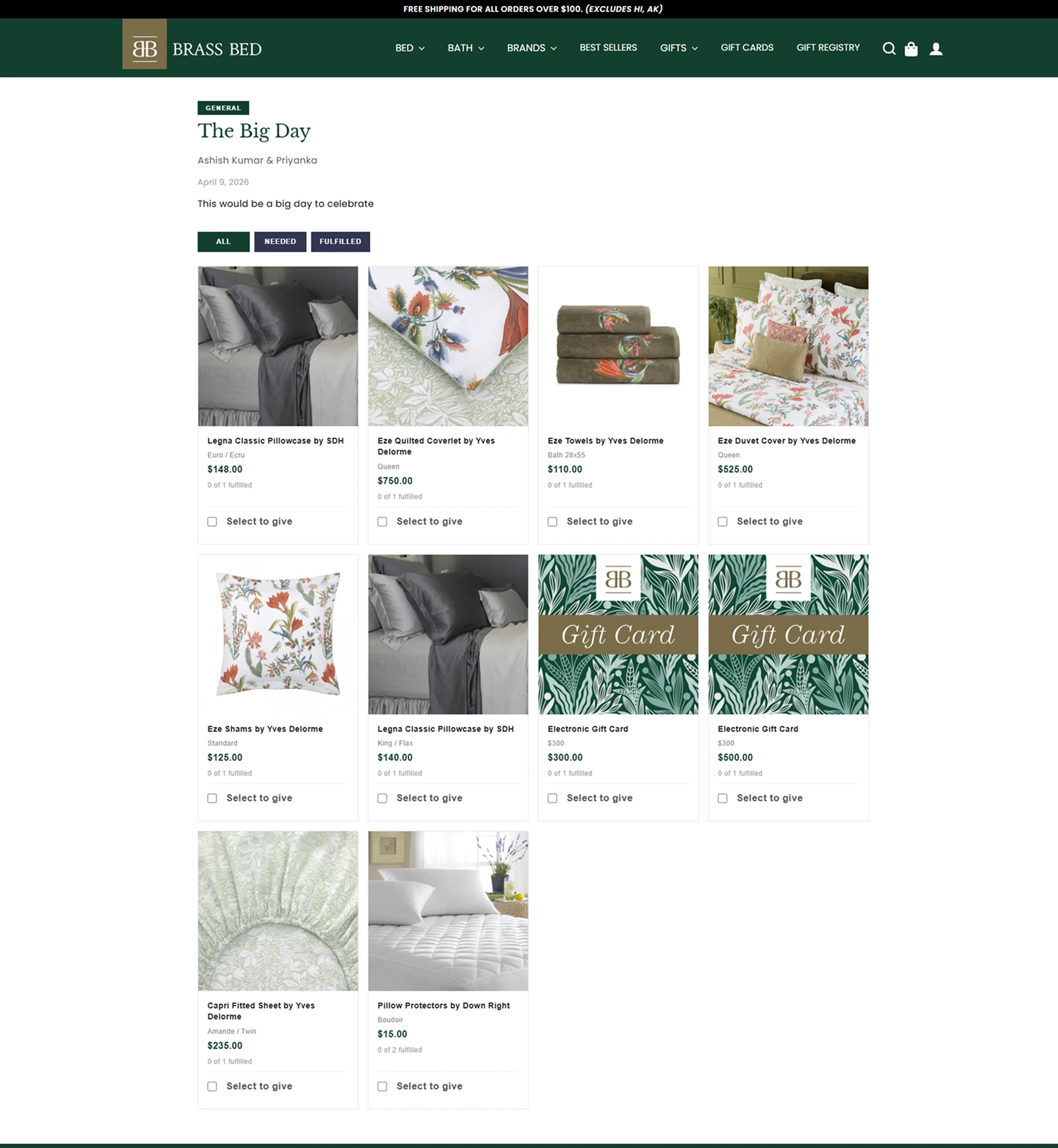
The gifter view — Every product, every color, every size the registrant requested. Tick “Select to give” on each item you’d like to send.
Add to cart & check out
Click Add Selected Gifts to Cart in the bar at the bottom of the page. Your selections move into your shopping cart with the exact options the registrant requested — no guessing required.
From there, check out as you would for any normal Brass Bed order. Gifts ship directly to the registrant’s shipping address (already on file with the registry), so you don’t need to enter it yourself.
Once your purchase is complete, the gifted items are automatically marked as fulfilled on the registry, so other guests don't accidentally double-buy.
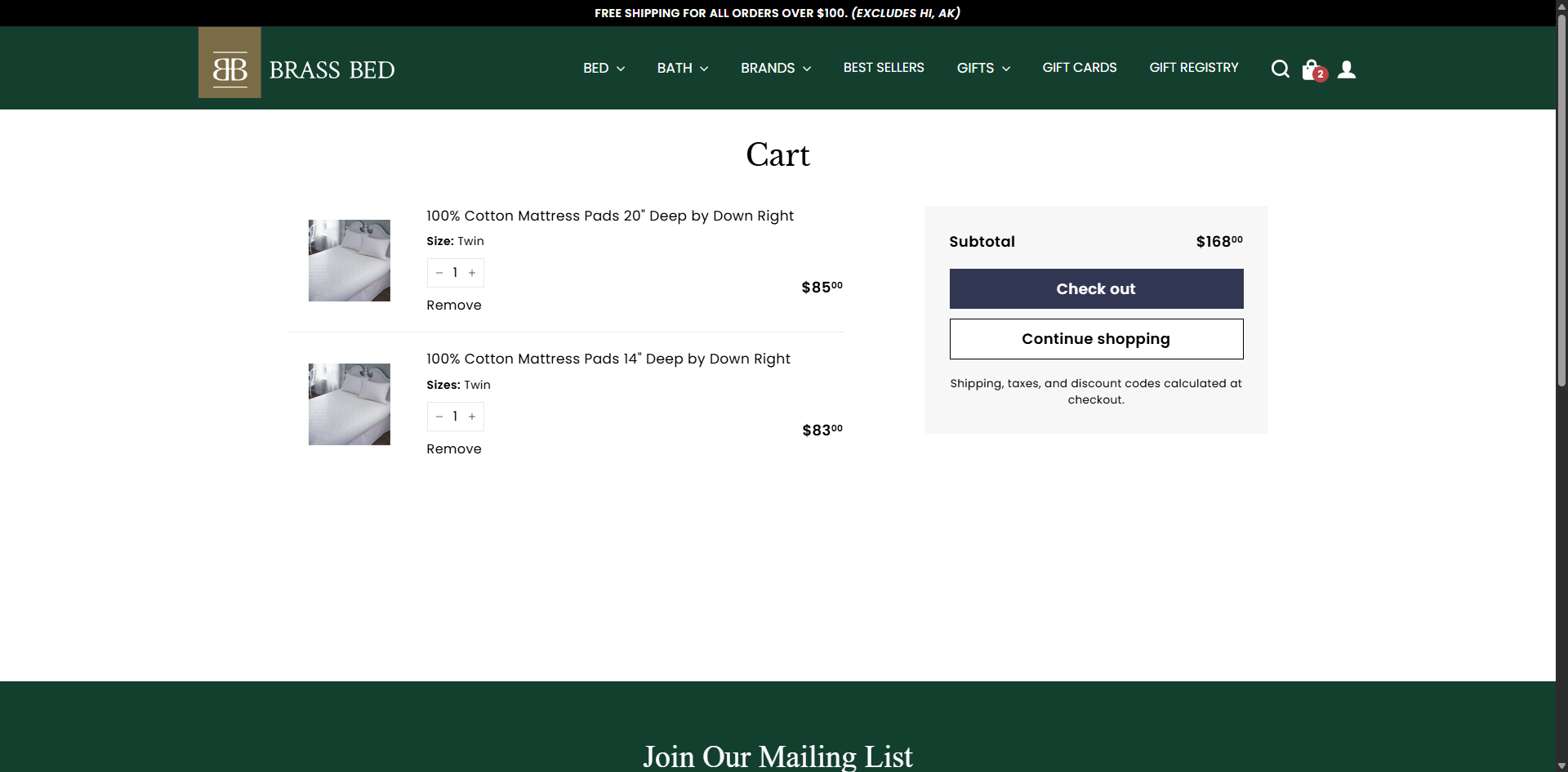
Cart with registry items — Selected gifts appear in your cart with the exact sizes and variants the registrant chose — here, two cotton mattress pads in Twin. The subtotal updates automatically; click Check out to complete your order.
Multiple gifters welcome: More than one person can shop the same registry without buying the same thing twice. As soon as a gift is purchased, it’s marked as fulfilled, so other guests will see it’s already taken care of.
Quick Reference
| Page | What it's for | Link |
|---|---|---|
| Gift Registry Home | Start here — create or find a registry | /pages/gift-registry |
| Create a Registry | The 6-step setup form (sign-in required) | /pages/create-a-registry |
| My Registries | Manage, publish, share, and edit your own registries | /pages/my-registries |
| Find a Registry | Public search to locate someone else's registry | /pages/find-a-registry |
Frequently Asked Questions
Yes. You can create as many registries as you like — for example, one for a wedding and another for a baby shower. Each registry has its own link, items, and shipping address.
Anything in the Brass Bed website. When you’re signed in, the “♥ Add to Registry” button appears on every product page — set the colors, sizes, and quantities you’d like, then add. For items made up of several pieces (like our bedding sets), each piece you choose becomes its own gift on your registry.
Absolutely. You can add or remove items, change details, and toggle visibility (Publish / Unpublish) at any time from the My Registries dashboard.
Every item on the registry shows the exact variant the registrant chose (e.g., "Euro / Ecru"). When a gifter clicks "Add Selected Gifts to Cart", the right variant is added automatically.
Directly to the shipping address the registrant entered when creating their registry. Gifters don't need to know or enter this address themselves.
Yes. During setup (Step 5: Privacy) you can password-protect your registry. Only people you share the password with will be able to view it. You can also leave it unpublished while you're still building it — nothing is visible to gifters until you click "Publish."
If in stock, yes — most gifts are sent within 48 business hours. However, since most of our products are made to order, please expect approximately 4–6 weeks before we can ship to your recipients.
Reach out to the Brass Bed customer service team — we’re happy to help with anything from setting up a registry to placing a gift order. For immediate help, call our Denver store at 303.322.1712 or email orders@brassbedfinelinens.com.
Ready to begin? Visit brassbedfinelinens.com/pages/gift-registry to create your registry, or open the link a friend has sent you to start shopping. Welcome — we're honored to be part of your celebration.